

Veteran-owned West Suffield, CT 844-217-2818

Maintenance software with a real crew behind it.

Work orders, PM checklists, lockout/tagout and spare parts for your whole team, on the floor or offline. And when a job is beyond you, our technicians write the PM plan or come out on site.

Free for up to 3 people and 25 units. No contract, no setup fee.

Why CircaCircuits

Built by technicians who've done the work.

We fix machines for a living, so we built the CMMS we wanted on our own jobs: quick on the floor, honest about what a check found, and safe before anyone picks up a wrench.

Nobody fills in a form with gloves on.

Big buttons on the phone, one tap for the next step, and it keeps working in the basement with no signal. Results send when you're back in range.

A tick box doesn't catch a failing bearing.

Checklists take real readings with limits, pass, flag or fail. A failed check opens a work order on its own, so nothing found on a PM gets forgotten.

Locks go on before wrenches come out.

A job on a machine with lockout points can't start until every one is confirmed locked, tagged and verified, and can't close until they come off.

Everything it does

Your whole maintenance program, in one place.

Everything below comes with Free unless it's marked Pro.

  • Work ordersPriority, equipment, who has it and when it's due. Time, parts, photos, video and voice notes from the phone.
  • Send a job to our crewOne button turns your work order into one of ours, with the unit's history, failed checks and lockout points attached.
  • PM schedules and checklistsBy date or by meter. Pass, flag and fail, numbers with limits, yes/no and notes. Start from our technicians' templates or write your own.
  • MetersHour meters and cycle counters on any unit. PM comes due by usage, and a checklist reading logs straight to the meter.
  • Equipment and QR labelsA tree of sites and areas, units with photos and the parts they're made of. Scan a label for the history or to report a problem.
  • Lockout/tagoutEach unit's energy isolation points, how to isolate and verify them, and a printable procedure. Work waits until all are locked.
  • Downtime with a priceEvery time a unit goes down is logged and costed by the hour, next to the repair costs.
  • QualificationsCertifications with expiry dates. A machine that needs one only goes to people who hold it, unless a manager overrides it on record.
  • Spare parts and purchase orders ProStock, reorder points and vendors. Parts used on a job come out of stock and onto its cost; "Reorder low stock" drafts the purchase orders.
  • Reports ProCompleted work, on-time rate, PM compliance, mean time to repair, hours, cost and downtime, with CSV exports.
  • Your team, with rolesOwners, managers, technicians and requesters. Requesters ask for work without seeing everything else. Invite people by email.
  • A morning summaryAn email each morning with what's overdue, due today and failed.
  • Works offlineChecklists, status changes, comments, time and meter readings are kept and sent in order when you reconnect.
  • Any device, nothing to installIt runs in the web browser on phones, tablets and computers, so everyone on the team can use it.
See it work

Your maintenance day, in one place.

From the request that comes in at 6 a.m. to the report on the manager's desk at the end of the month. These are the real screens.

Work orders your technicians will open

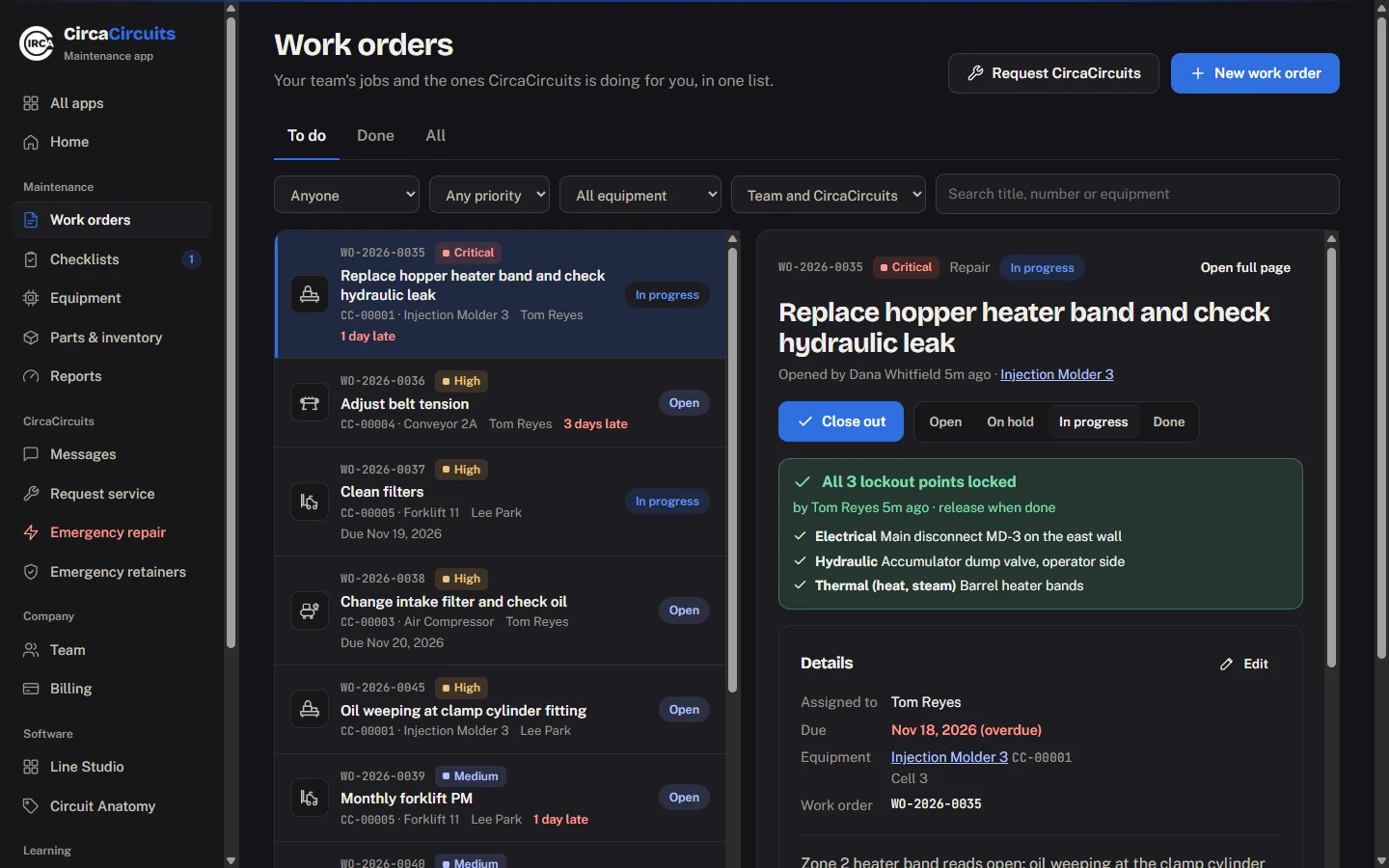
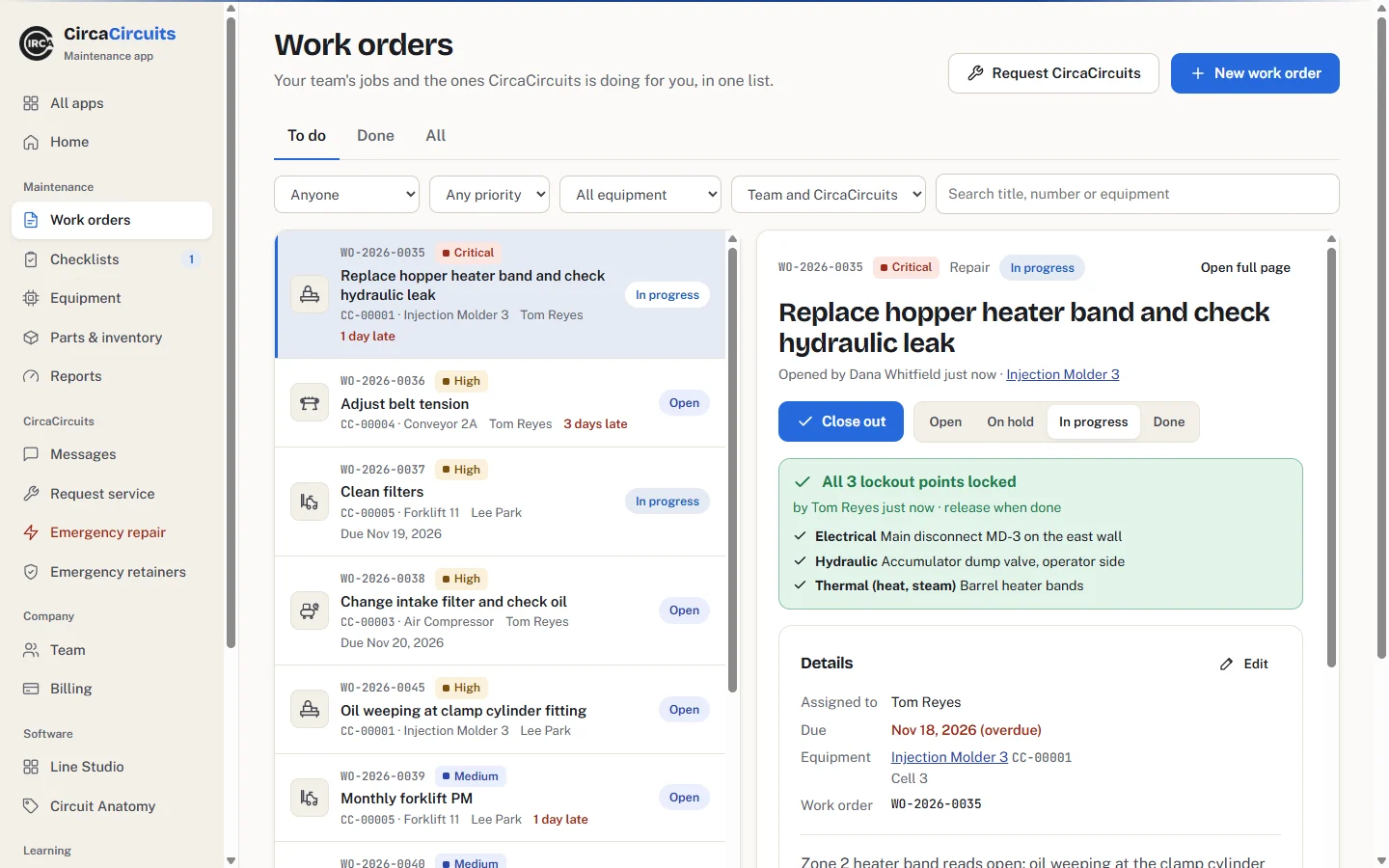
Your team's jobs and the ones we're doing for you, in one list: priority in words, the equipment, who has it and when it's due.
  • Log time, parts and photos from the phone
  • Labor at each person's rate, parts from your stock
  • "Request CircaCircuits" when a job is beyond you
The work orders list beside an open job: each job with its number, priority, equipment, technician and due date, late ones in red, and the open job showing all three lockout points lockedThe work orders list beside an open job: each job with its number, priority, equipment, technician and due date, late ones in red, and the open job showing all three lockout points locked

PM checklists that take readings

Schedule by date or by the hour meter. Checklists record pass, flag and fail, and numbers with the expected range right under them. A failed check opens a work order on its own.

  • Safety warnings shown before the step
  • Works offline: results send when you're back in range
A compressor checklist on a phone: a safety warning, a receiver pressure reading of 118 psi against an expected 90 to 125, pass/flag/fail for belt condition, and the hour meterA compressor checklist on a phone: a safety warning, a receiver pressure reading of 118 psi against an expected 90 to 125, pass/flag/fail for belt condition, and the hour meter

Every unit, its history and its lockout points

Register equipment with photos, locations and the parts it's made of. Each unit keeps its energy isolation points, its full work history and a printable QR label: scanning it opens the history or reports a problem.

An injection molder's page: its location, three lockout points with how to isolate and verify each, and its work order historyAn injection molder's page: its location, three lockout points with how to isolate and verify each, and its work order history

Spare parts that reorder themselves Pro

Stock levels, reorder points, vendors and which equipment uses each part. A part used on a work order comes out of stock and onto the job's cost. "Reorder low stock" drafts one purchase order per vendor.

Low stock

Intake filter element · Air compressor1 left · reorder at 2
Mechanical splice kit, 24 in0 left
Splice pins14 in stock

Reports that answer the questions you get asked Pro

What did maintenance cost this month? Are we keeping up with PM? Which machine keeps breaking, and how long was it down? It's all there, by location and by who did the work, and it exports to a spreadsheet.
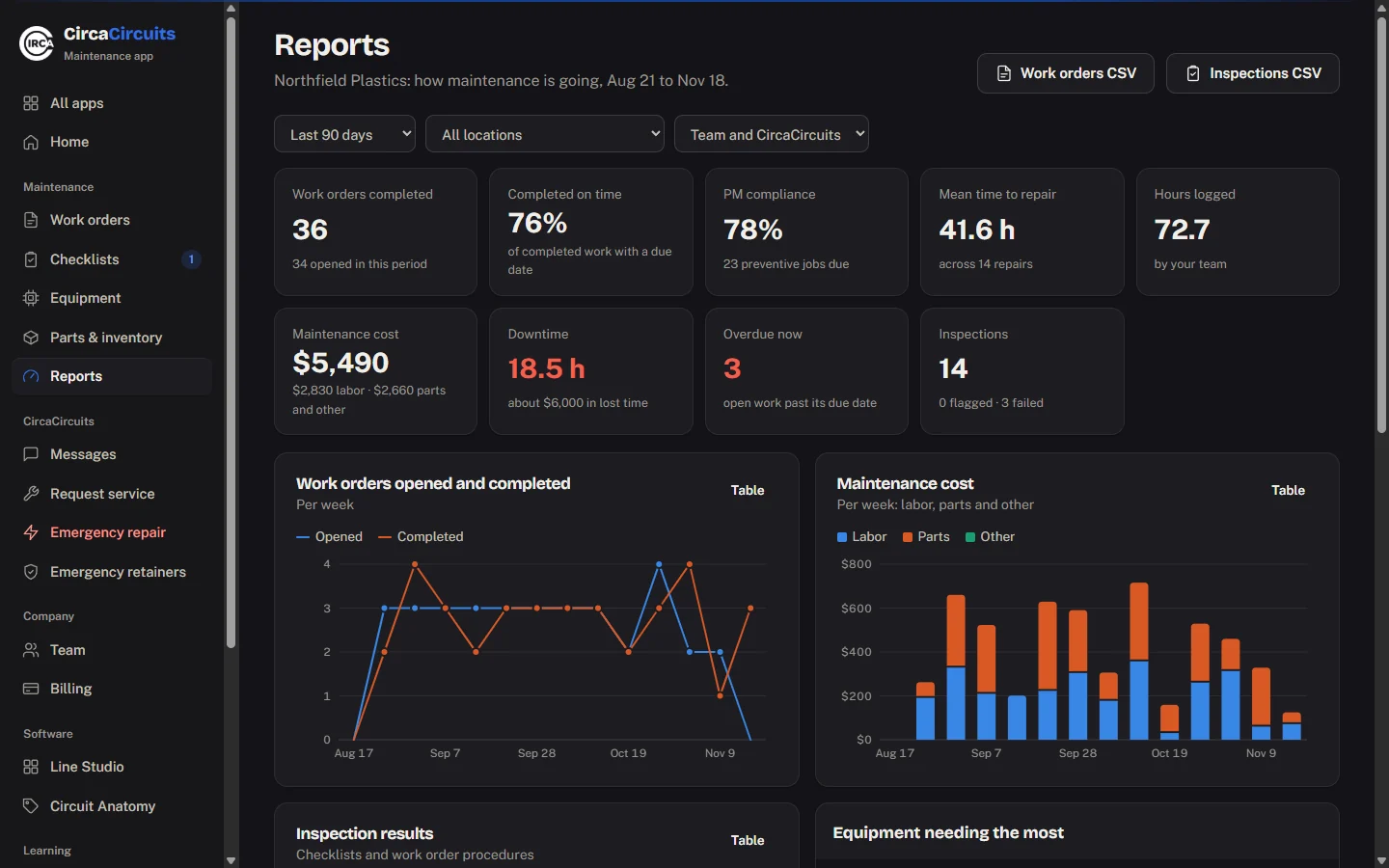
The reports page: work orders completed, on-time rate, PM compliance, mean time to repair, hours, maintenance cost, downtime and inspections, with charts of work and cost per weekThe reports page: work orders completed, on-time rate, PM compliance, mean time to repair, hours, maintenance cost, downtime and inspections, with charts of work and cost per week
Built by people who've stood at the disconnect

No job starts until every lock is on.

Each machine keeps its energy isolation points. A job on it can't go In progress until each one is confirmed locked, tagged and verified, and it can't close until the locks come off.

  • Lockout points listed by name, with how to isolate and verify each
  • Qualifications with expiry dates: machines that need them only go to people who hold them
  • Downtime with a price on it, next to repair costs in the reports
Lock out before you start, on a phone: Injection Molder 3's electrical and hydraulic points confirmed, the thermal point still to confirm, and the start button waitingLock out before you start, on a phone: Injection Molder 3's electrical and hydraulic points confirmed, the thermal point still to confirm, and the start button waiting
The part other CMMS companies can't sell you

Software, and the technicians who wrote it.

We're a working maintenance shop. When you'd rather not build a PM program from a blank page, or a machine goes down at 2 a.m., call on us.

For CMMS Pro customers

We write your machine’s PM plan.

Not a generic template: a plan made for that piece of equipment. Pick a unit in the app, order its plan and send us its manuals and photos. Our technicians go through them with its details and history, write the maintenance plan, and load the PM checklists straight into your account. No site visit needed.

Price on request · per unit, paid once

How it works
For CMMS customers

Emergency retainers: people on site when it goes down.

Keep a CircaCircuits technician on standby. When equipment goes down, we travel on site to repair it, with the unit's history, failed checks and lockout points already in hand.

Retainer plans
Pricing

Start free. Pay per person when you grow.

No contract and no setup fee. Change seats or cancel from your account at any time.

Free

$0for as long as you like

For a small shop getting organised.

  • Up to 3 people and 25 units
  • Work orders, PM schedules and checklists
  • Lockout/tagout, qualifications and downtime
  • QR labels, meters and working offline
Start free

CMMS Pro

$15per person, per month, plus tax

For teams that run on their numbers.

  • Everything in Free, for as many people and units as you need
  • Reports, and CSV exports of work and inspections
  • Spare parts, stock levels and purchase orders
  • Order a PM plan written by our technicians, from any unit's page
Start free, upgrade in the app

Upgrade from inside the app when you reach a Free limit. Nothing you've entered is ever lost.

Questions

Anything else?

Do I need a CircaCircuits service plan to use the CMMS?

No. The CMMS is for your own team on your own equipment. Our PM-plan writing and emergency retainers are optional extras for CMMS customers.

What happens when we reach the Free limits?

Nothing is lost. The app offers CMMS Pro when you invite a fourth person or add a 26th unit, and you choose how many seats to pay for. If you cancel Pro later, you keep everything and go back to the Free limits for adding more.

Does it work without a signal?

Yes. The pages you've opened stay on the device, and checklists, status changes, comments, time and meter readings made offline are sent in order when you reconnect. Photos need a connection.

Which devices does it run on?

Any phone, tablet or computer with a web browser. There is nothing to install: sign in at circacircuits.com and you are in.

Can our requesters ask for work without seeing everything?

Yes. Give them the requester role: they can ask for work and follow their own requests, without seeing the rest of your work orders, costs or reports.

How is the PM plan you write different from a template?

It's written for that one unit: our technicians go through its details, manuals and history and write the plan for it, then load the checklists into your account, ready to schedule.

Put your maintenance in one place this week.

Start free in a couple of minutes, or call 844-217-2818 and talk it through with a technician.